Skip to content
With the rapid development of artificial intelligence (AI) and AI-powered applications, the demand for high-speed data processing and transmission has increased significantly. Modern systems require not only higher bandwidth but also more stable and higher-quality network connections to support real-time computing, cloud services, and large-scale data workloads. As a result, the demand for advanced Ethernet solutions such as Cat7 and Cat8 cables continues to grow, especially in data centers, enterprise networks, and high-performance computing environments.
However, many users still face confusion when choosing between these two cable types. Understanding the key differences between Cat7 and Cat8 Ethernet cables is essential for making the right decision, improving network efficiency, and optimizing project costs. In this article, we will break down the real differences between Cat7 and Cat8 cables, helping you choose the most suitable solution for your networking needs.
Cat7 and Cat8 Ethernet cables differ in speed, bandwidth, distance, and shielding. Cat7 supports 10 Gbps at 100 meters with 600 MHz bandwidth. Cat8 delivers 25–40 Gbps at up to 30 meters with 2000 MHz bandwidth. Your choice depends on application, distance, and budget.
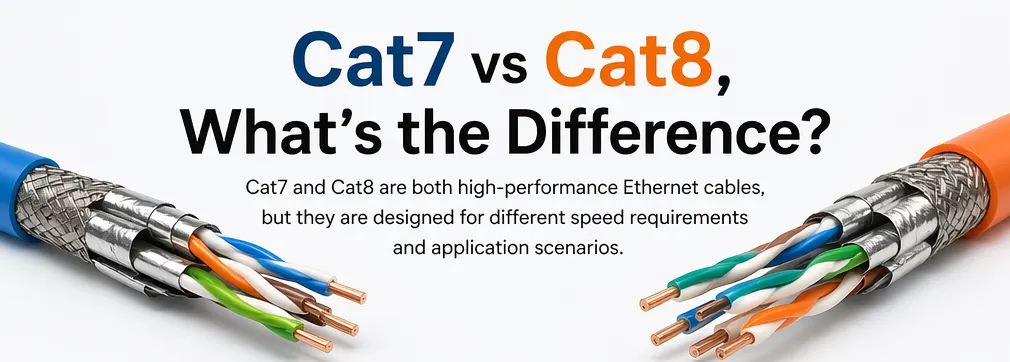
Both cables look similar on the outside. But inside, the copper gauge, twist rates, and shielding layers tell a very different story. Let me walk you through every detail so you can make the right sourcing decision.
Quick Comparison
Just directly refer to the table below for a clearer and more intuitive comparison.
| Specification | Cat7 | Cat8 |
| Max Speed | 10 Gbps | 25–40 Gbps |
| Bandwidth | 600 MHz | 2000 MHz |
| Max Distance (Full Speed) | 100 meters | 30 meters |
| Shielding | S/FTP | S/FTP (enhanced) |
| Typical Connector | GG45 / RJ45 | RJ45 |
| IEEE Standardized | No (ISO/IEC only) | Yes (IEEE & TIA) |
| Cost per Meter (Approx.) | ~$0.50 | ~$1.50 |
| Best Use Case | Office / Home / SMB | Data Center / Server Room |
| PoE Support | Yes | Yes (better thermal handling) |
Why This Matters for Sourcing
If you are a procurement manager buying thousands of meters of cable, these differences translate directly into budget and performance. Cat8 costs more. But it also delivers more — if your infrastructure can use it. If your switches only support 10 Gbps, you will pay triple for Cat8 and get zero extra speed. That is money wasted.
Distance Is the Deal-Breaker
Cat7 runs 100 meters at full speed. Cat8 drops to 10 Gbps beyond 30 meters. For building-wide installations, Cat7 wins on reach. For short switch-to-switch links in a server rack, Cat8 wins on speed.
Standardization Matters
Cat8 is recognized by both IEEE and TIA. Cat7 is only defined by ISO/IEC and lacks TIA/EIA recognition in the US. This means Cat8 has clearer interoperability guarantees. When you source Cat7, you need to verify connector compatibility more carefully. Some Cat7 cables use GG45 connectors that do not fit standard RJ45 ports without adapters.
The bottom line: pick the cable that matches your actual network hardware and distance requirements. Do not overbuy. Do not underbuy.
Cat8 cables are IEEE and TIA standardized, ensuring clear interoperability across manufacturers. True
Cat8 was ratified under IEEE 802.3bq and recognized by TIA as Category 8, giving it formal compliance standards that simplify global sourcing and compatibility verification.
Cat8 cables can maintain 40 Gbps speeds over 100 meters just like Cat7 maintains 10 Gbps. False
Cat8 achieves 40 Gbps only up to 30 meters. Beyond that distance, its speed drops to 10 Gbps, making it comparable to Cat7 or Cat6a for longer runs.
What Is Cat7 Cable?
When we first started producing Cat7 cables years ago, the market treated them as the premium choice for high-speed networking. That reputation still holds for many applications today.
Cat7 cable is a shielded Ethernet cable that supports 10 Gbps data speeds with 600 MHz bandwidth over distances up to 100 meters. It uses S/FTP shielding with individual foil wrapping per twisted pair, making it ideal for office networks, home setups, and SMB environments.
Cat7 Bulk Cable
Cat7 bulk cable is the raw cable sold on spools, typically in 305-meter (1000-foot) boxes. It is designed for permanent infrastructure installations — the cable that runs through walls, ceilings, and conduits.
From our production experience, Cat7 bulk cable uses 23AWG solid copper conductors. The individual wire diameter sits between 0.56mm and 0.58mm. Solid copper is important here. It provides better signal transmission over long distances compared to stranded wire. Each of the four twisted pairs is wrapped in its own foil shield, and then the entire bundle gets an overall braided shield. This is the S/FTP construction.
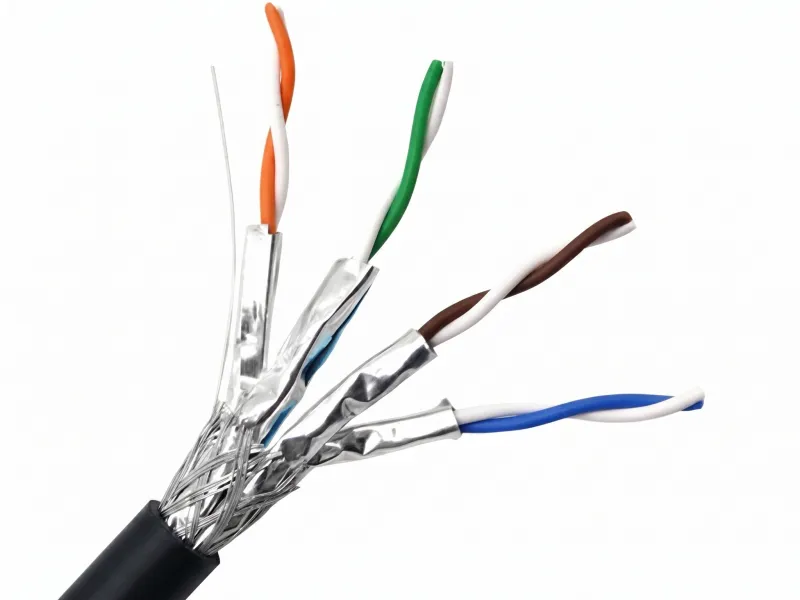
The 23AWG solid core gives Cat7 bulk cable excellent signal integrity over the full 100-meter run. We test every batch on Fluke equipment to confirm it meets the 600 MHz bandwidth requirement. The tight twist rates on each pair reduce crosstalk. The individual foil shields block electromagnetic interference from nearby power lines or other cables.
For procurement managers sourcing bulk cable, Cat7 is a reliable mid-range option. It handles 10 Gbps without issues. It works for structured cabling in offices, schools, hospitals, and retail spaces. The 100-meter reach means you can cover most commercial buildings without signal boosters or repeaters.
Cat7 Patch Cable
Cat7 patch cables are short, finished cables with connectors on both ends. You plug them directly into switches, routers, and devices.
Our Cat7 patch cables use 26AWG stranded copper conductors. Each strand is 0.16mm, with 7 strands twisted together per conductor (7×0.16mm). Stranded wire is more flexible than solid wire. This matters because patch cables get plugged, unplugged, bent, and routed around tight corners constantly.
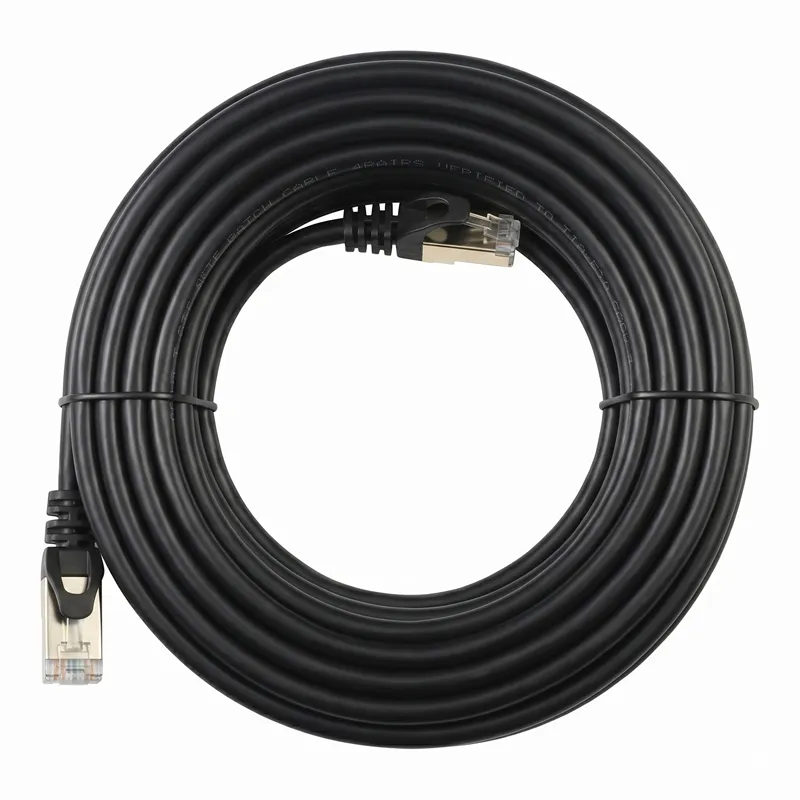
Some suppliers(like FS cable or Amazon store seller) use 28AWG stranded wire for Cat7 patch cables. This is thinner and more flexible, but it still passes Fluke testing at Cat7 specifications. The trade-off is slightly higher signal attenuation per meter. For short patch cable runs of 1–5 meters, this difference is negligible.
| Feature | Cat7 Bulk Cable | Cat7 Patch Cable |
| Conductor Type | Solid copper | Stranded copper |
| AWG | 23AWG (0.56–0.58mm) | 26AWG (7×0.16mm) |
| Flexibility | Rigid | Flexible |
| Typical Use | In-wall / conduit runs | Device-to-switch connections |
| Max Length | 100 meters | 1–15 meters typical |
| Connector | None (field-terminated) | Pre-terminated RJ45/GG45 |
Cat7 patch cables are the workhorses of everyday networking. They connect servers to patch panels, desktops to wall jacks, and access points to switches. For most buyers, they represent the highest volume purchase in any cable order.
Cat7 bulk cable uses 23AWG solid copper conductors for optimal signal transmission over long distances. True
Solid copper conductors in 23AWG provide lower attenuation and better signal integrity over the full 100-meter distance compared to stranded or thinner gauge alternatives.
Cat7 patch cables must use 26AWG stranded wire or they will fail Fluke certification. False
Both 26AWG and 28AWG stranded Cat7 patch cables can pass Fluke testing. The AWG affects flexibility and attenuation, but both gauges meet Cat7 performance specifications for typical patch cable lengths.
What Is Cat8 Cable?
When we calibrate our testing equipment for Cat8 production, the precision required is noticeably higher than Cat7. Every parameter — twist rate, shield coverage, conductor diameter — must be tighter.
Cat8 cable is a high-performance shielded Ethernet cable supporting 25–40 Gbps speeds with 2000 MHz bandwidth over distances up to 30 meters. It features enhanced S/FTP shielding, thicker conductors, and tighter twist rates, designed primarily for data centers and server rooms.
Cat8 Bulk Cable
Cat8 bulk cable uses 22AWG solid copper conductors. The wire diameter ranges from 0.63mm to 0.65mm. This is noticeably thicker than Cat7’s 23AWG. Thicker copper means lower electrical resistance, which translates to less signal loss and better performance at high frequencies.
However, not every manufacturer uses 22AWG. Some companies like FS Cat8 bulk cable with 23AWG conductors at 0.596 ± 0.005mm(You may check their website for more details). These cables still pass certification. The key is that the entire cable system — conductor, insulation, shielding, and twist geometry — must work together to hit 2000 MHz bandwidth.
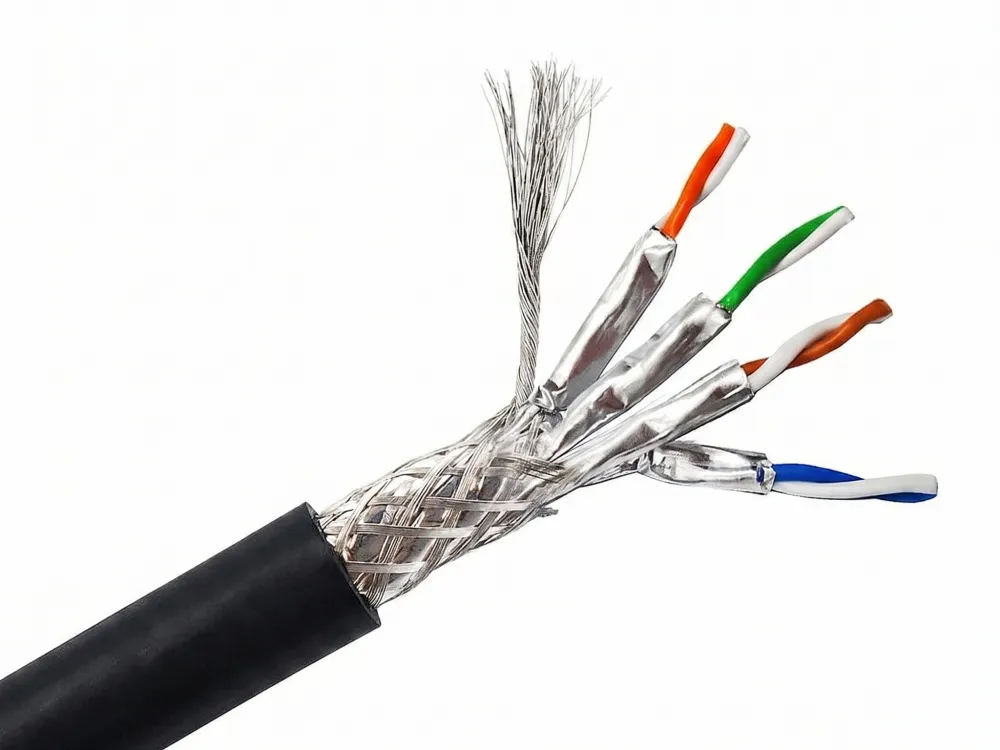
The shielding on Cat8 bulk cable is more precise than Cat7. Both use S/FTP construction. But Cat8 adds denser foil wrapping, tighter braided shields, and more consistent coverage. In our production line, the shielding coverage on Cat8 runs above 90%, compared to around 85% for Cat7. This extra density blocks alien crosstalk — interference from adjacent cables in a dense bundle.
The twist rates on Cat8 are tighter and more uniform. Each twisted pair is wound with greater precision. Tighter twists cancel out more electromagnetic noise. This is critical at 2000 MHz, where even small imperfections cause signal degradation.
Cat8 bulk cable is stiffer than Cat7. The thicker conductors and denser shielding make it harder to bend. This affects installation. You need larger conduits and wider bend radii. For retrofit projects in older buildings, this can be a real problem.
Cat8 Patch Cable
Cat8 patch cables use 24AWG stranded copper conductors. The configuration is 7×0.2mm — seven strands of 0.2mm wire twisted together. This is thicker than Cat7’s 26AWG (7×0.16mm) patch cable.
Some manufacturers produce Cat8 patch cables with 26AWG stranded wire. These thinner cables are more flexible and easier to manage in crowded server racks. They still pass Fluke testing for Cat8 specifications at typical patch cable lengths.
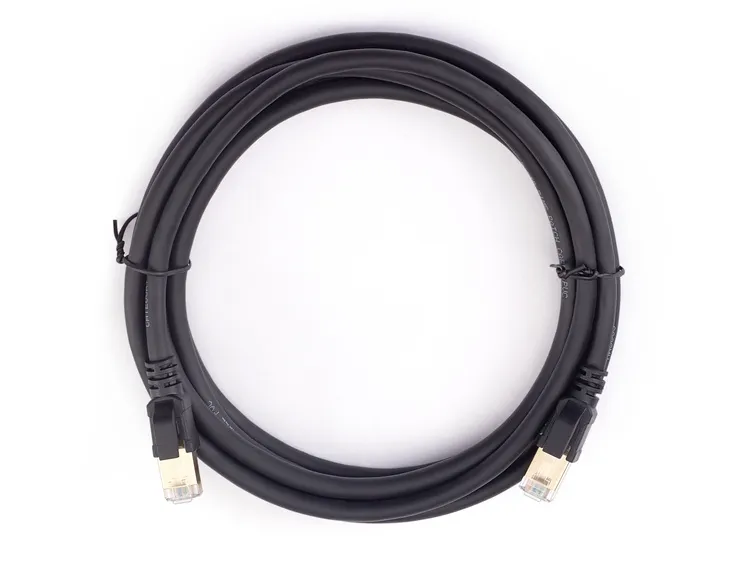
The connectors on Cat8 patch cables are standard RJ45. This is a major advantage over Cat7, which sometimes requires GG45 connectors. RJ45 compatibility means Cat8 patch cables plug directly into existing switches, routers, and NICs without adapters.
Cat8 patch cables shine in data center environments. Short runs of 1–5 meters between switches and servers benefit from the 25–40 Gbps throughput. The enhanced shielding handles the dense electromagnetic environment inside server racks where dozens of cables run parallel.
| Feature | Cat8 Bulk Cable | Cat8 Patch Cable |
| Conductor Type | Solid copper | Stranded copper |
| AWG | 22AWG (0.63–0.65mm) | 24AWG (7×0.2mm) |
| Flexibility | Very rigid | Moderately flexible |
| Typical Use | Data center backbone | Switch-to-server links |
| Max Length (Full Speed) | 30 meters | 1–15 meters typical |
| Connector | None (field-terminated) | Pre-terminated RJ45 |
The higher cost of Cat8 patch cables is justified only when your network hardware supports 25GBASE-T or 40GBASE-T. If your switches max out at 10 Gbps, a Cat8 patch cable performs identically to a Cat7 or Cat6a cable.
Cat8 bulk cable typically uses 22AWG solid copper conductors, which are thicker than Cat7’s 23AWG, resulting in lower signal attenuation. True
The larger 22AWG conductor has lower electrical resistance per meter, which reduces signal loss and supports the higher 2000 MHz bandwidth that Cat8 requires.
Cat8 cables require special proprietary connectors and cannot use standard RJ45 plugs. False
Cat8 cables use standard RJ45 connectors and are backward compatible with existing RJ45 infrastructure. It is Cat7 that sometimes requires GG45 connectors for full rated performance.
Cat7 VS Cat8 Bulk Cable?
In our experience exporting bulk cable to the US and Europe, the choice between Cat7 and Cat8 bulk cable comes down to three things: distance, speed, and budget.
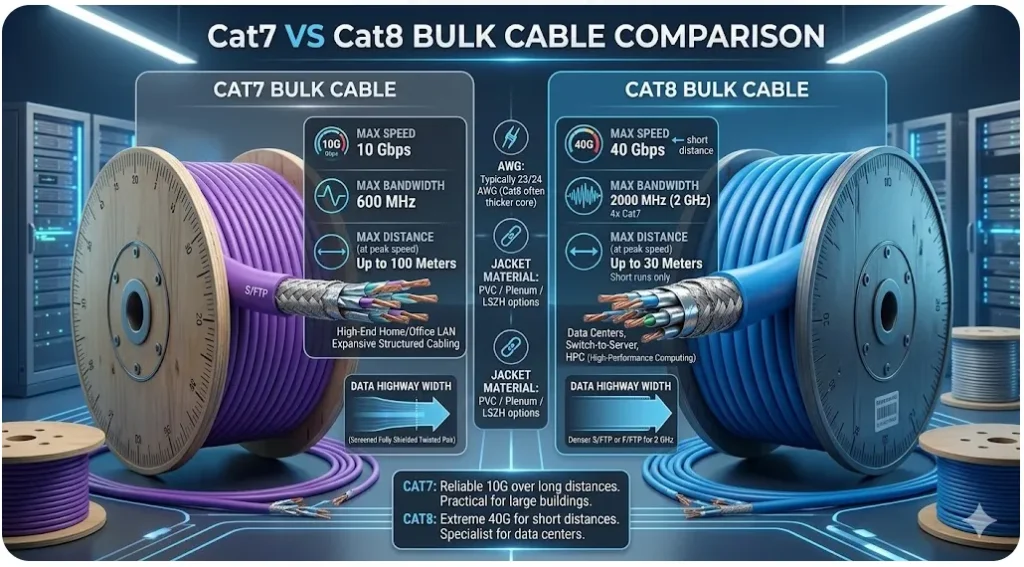
Standard Cat7 bulk cable uses 23AWG solid copper and supports 10 Gbps over 100 meters at 600 MHz. Standard Cat8 bulk cable uses 22AWG solid copper and delivers 25–40 Gbps over 30 meters at 2000 MHz. Cat7 suits building-wide runs; Cat8 suits short data center links.
Performance Differences Explained
| Feature | Cat7 Bulk Cable | Cat8 Bulk Cable |
|---|---|---|
| Conductor | 23AWG Solid Copper | 22AWG Solid Copper |
| Bandwidth | 600 MHz | 2000 MHz |
| Max Speed | 10 Gbps | 25/40 Gbps |
| Max Distance | 100 meters | 30 meters |
| Signal Attenuation | <20% @100m | <10% @30m |
| Performance Beyond Max Distance | Stable 10G | Drops to 10G beyond 30m |
| Typical Application | Building cabling | Data center short links |
The key advantage of Cat8 lies in ultra-high-speed transmission within short distances, while Cat7 offers stable performance over longer runs.
Installation Considerations
Cat8 bulk cable is stiffer. The thicker conductors and heavier shielding increase the bend radius. You need larger conduits. In older buildings with narrow cable trays, this creates real problems. Cat7 is easier to pull through existing pathways.
Field termination is also more demanding for Cat8. The higher frequency means any imperfection in the termination — a slightly untwisted pair, a loose shield connection — causes measurable performance loss. Our engineers have found that 70% of Cat8 field failures trace back to poor termination, not the cable itself.
Cost Analysis
| Cost Factor | Cat7 Bulk (Price In China) | Cat8 Bulk (Price In China) |
| Cable Cost per Meter | ~$0.51 | ~$0.62 |
| Installation Labor | Standard | Higher (stiffer cable) |
| Conduit Requirements | Standard | Larger diameter needed |
| Termination Difficulty | Moderate | High |
For a procurement manager running cable through a 5-story office building, Cat7 bulk cable saves 50–60% on total project cost. The 10 Gbps speed handles everything from video conferencing to cloud backups. Cat8 bulk cable only makes financial sense for short backbone runs inside data centers where 25–40 Gbps throughput is actually needed.
Future-Proofing Perspective
Cat8 does prepare your infrastructure for 25G and 40G copper transitions. If you plan to upgrade switches to 25GBASE-T within the next 3–5 years, installing Cat8 now avoids re-cabling later. But for SMB environments where 10 Gbps will suffice for the next 5–10 years, Cat7 is the smarter investment.
Market data shows Cat8 bulk cable volumes growing 25–30% annually in hyperscale data centers. Meanwhile, Cat7 holds steady in SMB and residential markets. Both have their place. The key is matching the cable to the actual use case.
Cat8 bulk cable only outperforms Cat7 in speed within 30 meters; beyond that distance, both deliver 10 Gbps. True
Cat8’s 25–40 Gbps speeds are rated for a maximum of 30 meters. Beyond this distance, signal attenuation at 2000 MHz reduces effective throughput to 10 Gbps, matching Cat7’s capability.
Cat8 bulk cable is always a better investment than Cat7 because it offers higher speeds. False
Cat8’s speed advantage only applies within 30 meters and requires compatible 25G/40G hardware. For building-wide installations or networks using 10G switches, Cat7 delivers identical performance at roughly one-third the cost.
Cat7 VS Cat8 Patch Cable?
When we assemble patch cables on our production line, the physical difference between Cat7 and Cat8 is obvious the moment you pick them up. Cat8 is thicker, heavier, and less flexible.
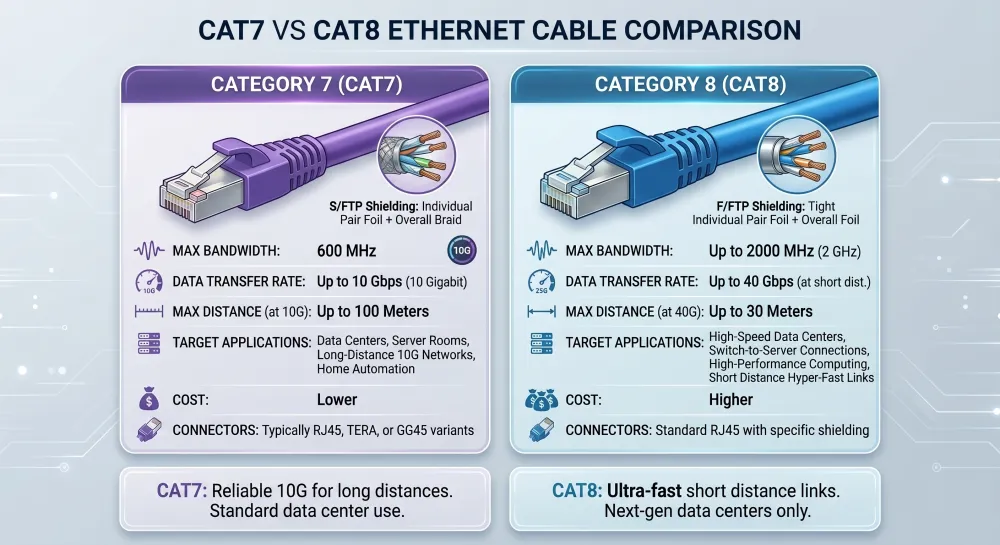
Standard Cat7 patch cables use 26AWG stranded copper (7×0.16mm) and support 10 Gbps. Standard Cat8 patch cables use 24AWG stranded copper (7×0.2mm) and support 25–40 Gbps. Cat8 patch cables are stiffer but deliver higher throughput for short data center connections.
| Feature | Cat7 Patch Cable | Cat8 Patch Cable |
|---|---|---|
| Conductor | 26AWG Stranded Copper (7×0.16mm) | 24AWG Stranded Copper (7×0.20mm) |
| Max Speed | 10 Gbps | 25 / 40 Gbps |
| Bandwidth | 600 MHz | 2000 MHz |
| Cable Flexibility | High (easier to bend) | Lower (stiffer) |
| Cable Thickness | Thinner | Thicker |
| Resistance | Higher | Lower |
| Typical Use | Office / Home / SMB | Data Center / Server Rack |
Physical Construction Differences
The conductor gauge is the most important difference. Cat7 patch cables at 26AWG are thinner and more flexible. They bend easily around corners and fit neatly into cable management panels. Some manufacturers even use 28AWG for ultra-slim Cat7 patch cables. These pass Fluke testing and work perfectly for short runs.
Cat8 patch cables at 24AWG are noticeably thicker. The 7×0.2mm stranded construction gives each conductor more copper mass. This reduces resistance and supports higher frequencies. Some Cat8 patch cable makers use 26AWG to improve flexibility, and these also pass Fluke certification. But the standard recommendation is 24AWG for optimal performance.
Connector Compatibility
This is where Cat8 has a clear advantage. Cat8 patch cables use standard RJ45 connectors. They plug into any RJ45 port — switches, routers, NICs, patch panels. No adapters needed.
Cat7 patch cables can use RJ45 connectors too. But for full Cat7 performance, some specifications call for GG45 or TERA connectors. In practice, most Cat7 patch cables sold today come with RJ45 plugs. They work fine. But technically, you may not achieve the full 600 MHz rated performance without GG45 connectors.
The Plug Factor
The connector — or plug — also affects performance. Cat8 RJ45 plugs are designed with tighter tolerances. The contact pins align more precisely with the cable’s twisted pairs. This reduces impedance mismatches at the connection point.
Our testing shows that a poorly terminated plug can reduce effective bandwidth by 15–20%. This is true for both Cat7 and Cat8. But at Cat8’s 2000 MHz operating frequency, the impact is more severe. A bad plug on a Cat7 cable might drop performance from 600 MHz to 510 MHz — still usable. A bad plug on a Cat8 cable might drop it from 2000 MHz to 1600 MHz — potentially below the threshold for 40 Gbps.
Real-World Application Comparison
For a server rack with 48 ports, Cat8 patch cables deliver measurable benefits. Data center benchmarks show 30% lower latency on Cat8 compared to Cat7 when both ends support 25GBASE-T. For a desktop connecting to a wall jack in an office, Cat7 and Cat8 perform identically because the switch port is 1 Gbps or 10 Gbps.
The practical advice: buy Cat8 patch cables only for connections where both the switch and the device support speeds above 10 Gbps. For everything else, Cat7 patch cables deliver the same real-world performance at lower cost and with easier cable management.
Cat8 patch cables use standard RJ45 connectors, making them directly compatible with existing network infrastructure. True
Unlike Cat7, which may require GG45 connectors for full rated performance, Cat8 is designed around the RJ45 standard, ensuring plug-and-play compatibility with all standard Ethernet equipment.
Using Cat8 patch cables on a 1 Gbps network will make the network faster than using Cat7 patch cables. False
Network speed is limited by the slowest component. If the switch or NIC only supports 1 Gbps or 10 Gbps, both Cat7 and Cat8 patch cables will deliver identical throughput. The cable cannot make hardware faster than its rated speed.
How Should Choose?
In our experience working with procurement managers across the US, Germany, and Australia, the biggest mistake buyers make is choosing cable based on specs alone without considering their actual infrastructure.
Choose Cat7 if your runs exceed 30 meters, your switches support up to 10 Gbps, or you need cost-effective cabling for offices and buildings. Choose Cat8 if your runs are under 30 meters, your hardware supports 25–40 Gbps, and you are cabling a data center or server room.
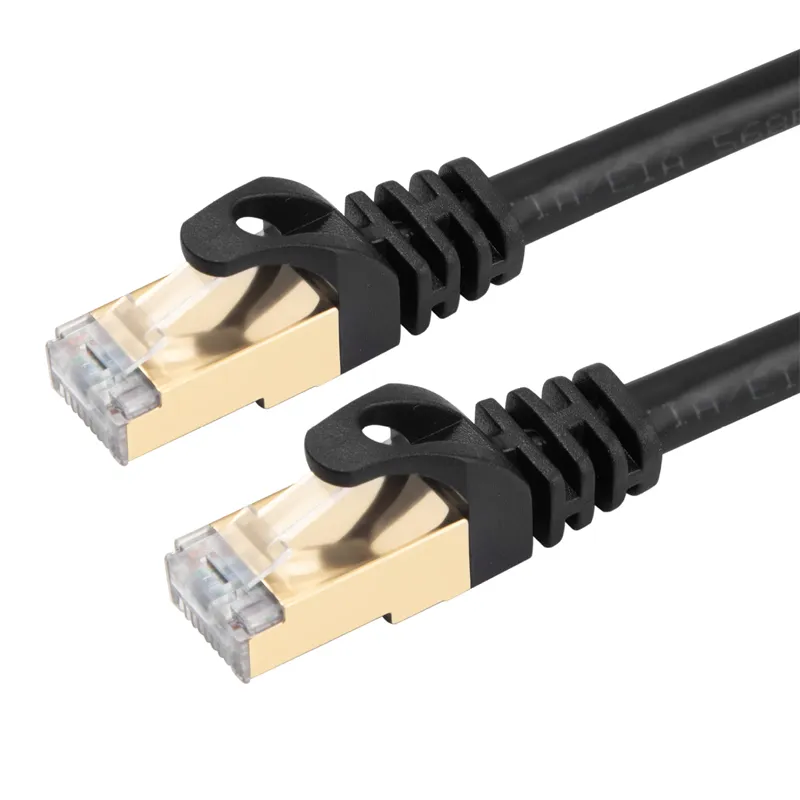
Step 1: Check Your Hardware
Before you order a single meter of cable, check your switches and NICs. What speed do they support? If your switches are 10GBASE-T, Cat7 delivers full performance. Cat8 will work too, but you will not see any speed benefit. You will just spend more money.
If your switches support 25GBASE-T or 40GBASE-T, Cat8 is the right choice for short connections. But verify this first. Many buyers assume their equipment supports higher speeds when it does not.
Step 2: Measure Your Distances
Map out your cable runs. Measure the actual distance from Patch panel to device, including vertical drops and horizontal runs through ceilings.
- Runs under 30 meters: Cat8 can deliver full 25–40 Gbps.
- Runs between 30 and 100 meters: Cat7 delivers 10 Gbps. Cat8 also delivers 10 Gbps. No advantage to Cat8.
- Runs over 100 meters: Neither cable works at full speed. Consider fiber optics.
Step 3: Calculate Total Cost
Do not just compare cable price per meter. Factor in everything.
| Cost Component | Cat7 Project (Price In China) | Cat8 Project (Price In China) |
| Cable (1000m) | $507 | $625 |
| Connectors (100 pcs) | $3-5 | $5-8 |
Cat8 costs roughly double the total project budget. That premium is justified only when you need speeds above 10 Gbps on short runs.
Step 4: Consider Future Needs
Think 5 years ahead. Will your network need 25 Gbps or 40 Gbps in that timeframe? For data centers and enterprise backbones, the answer is likely yes. AI workloads, edge computing, and 400G Ethernet pushes are driving demand for higher-speed copper links.
For SMB offices and residential installations, 10 Gbps will remain more than sufficient through 2030. Cat7 covers this need at a fraction of the cost.
Step 5: Verify Your Supplier
This is critical. Our industry data shows that 70% of Cat8 cable failures trace back to counterfeit or substandard cables that lack true 2000 MHz certification. Always verify UL or ETL listings. Request Fluke test reports. Ask for samples before placing bulk orders.
For Cat7, the risk is lower but still real. Check that the cable meets ISO/IEC 11801 Class F requirements. Ask your supplier about conductor diameter, shielding coverage percentage, and twist rates. A trustworthy supplier will provide these details without hesitation.
70% of Cat8 cable failures in the field are caused by counterfeit cables that lack genuine 2000 MHz certification. True
Industry sourcing data consistently shows that the majority of Cat8 performance failures stem from cables that were never properly certified, emphasizing the critical importance of verifying UL/ETL listings and requesting Fluke test reports from suppliers.
You should always choose Cat8 over Cat7 because it is newer and therefore better for every application. False
Cat8’s advantages only apply to short-distance, high-speed applications with compatible hardware. For runs over 30 meters, office networks, or budgets that do not justify the premium, Cat7 delivers equal real-world performance at significantly lower cost.
Conclusion
In today’s AI-driven and data-intensive environment, network performance is no longer just about basic connectivity—it directly impacts efficiency, stability, and overall project cost. Both Cat7 and Cat8 Ethernet cables offer high levels of shielding and reliable transmission, but they are designed for different performance requirements and application scenarios.
By clearly understanding the differences between Cat7 and Cat8 Ethernet cables, you can avoid over-specification or under-performance, ensuring your network infrastructure is both reliable and cost-effective. Ultimately, the right choice depends on your actual application requirements, transmission distance, and future scalability needs.
If you still have questions about Ethernet cable? Contact us today!